Smore/Finalsite Partnership Summary
What is included with the special Smore/Finalsite Trial?
- Access to Smore via Finalsite's BbComms email interface
- 10 Smore newsletter credits
- Upgraded Educator backgrounds
- Full Accessibility support
(ADA, COPPA, FERPA, WCAG 2.0 AA Support) - Newsletter translation
What is included in the purchase of a Smore/Finalsite Smore for Teams account?
A school license is a highly discounted multi-user plan which includes all the features above, plus:
- Management dashboard to add/remove members, oversee communications, & create branded templates.
- Collaboration and template sharing
- Unlimited newsletter credits
- Pro Plan features
(File attachments, extensive color panel, extra fonts, custom backgrounds & more...) - Premium customer support
Frequently Asked Questions
What is the Smore/Finalsite integration?
Finalsite and Smore have partnered together to provide an improved experience for creating and delivering beautiful content. All Finalsite District and School Administrator Account-types (including Principal Accounts) will be able to access and leverage the power of the Smore platform inside of their Finalsite Mass Notification system----create and access amazing newsletters in Smore then send them to all of your stakeholders with Finalsite.
Who has access to the Smore integration inside of Finalsite?
The following Finalsite account types have access to this special Smore integration:
- District Administrator
- School Administrator
- Principal
How many newsletters can be created through the special trial version of Smore that is offered through the integration?
Finalsite users who access Smore from the integration are given 10 newsletter credits as part of their special trial experience. These newsletter credits are for one-time use and Do Not renew in subsequent years. Every time a user creates a new newsletter, one of the newsletter credits are used. The same newsletter can be re-used and re-sent in Finalsite without affecting the number of remaining credits. Keep in mind that a user can only edit a previously created newsletter up to 4 weeks after the initial publishing of said newsletter.
How do I upgrade to a Smore School-wide License?
If you have multiple users that want to upgrade, simply go to www.smore.com/demo and fill out the inquiry form.
How do I edit newsletters from within the Finalsite integration?
You can edit a previously created newsletter by selecting VIEW ALL at the bottom of the drop down menu. See below:
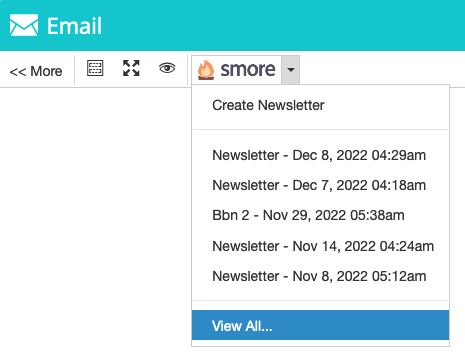
Then select a newsletter you would like to edit and select the EDIT button as shown below:
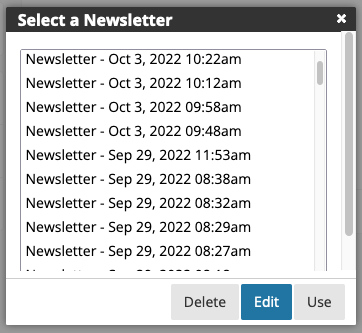
If Smore cannot determine your account credentials, you may be prompted to log in before you can edit a newsletter.
Can I upgrade to an individual Smore Pro account?
Yes. Simply go to www.smore.com/pricing/ and choose the appropriate plan for you.
Who do I reach out to if I have more questions?
Please reach out to your Finalsite support team member for more questions!
You can also access Support documentation at https://help.smore.schoolstatus.com